> ## Documentation Index
> Fetch the complete documentation index at: https://docs.o1.exchange/llms.txt
> Use this file to discover all available pages before exploring further.

# Wallets

> Secure wallet integration and management

## Wallet Management Features

Manage your wallets seamlessly within o1.exchange. Our platform provides a robust set of tools for creating, importing, exporting, and organizing your wallets—all under your single o1.exchange account.

### 1. Create New Wallets

Easily generate new wallets directly from your o1.exchange dashboard. Each wallet is securely managed and linked to your account, allowing you to organize multiple wallets for different purposes or strategies.

### 2. Import Existing Wallets

Bring your existing wallets into o1.exchange by importing them using your secret key. All imported wallets are managed in a non-custodial manner, ensuring you retain full control and ownership.

### 3. Export Wallets with Recovery Phrase

Export all your wallets at once using a single 12-word recovery phrase. This allows you to back up and restore up to 100 wallets simultaneously, making wallet management and migration simple and efficient.

### 4. Individual Wallet Actions

For each wallet, you can:

* **Archive**: Move wallets you no longer use to an archived state.
* **Set as Main Wallet**: Designate any wallet as your primary wallet for transactions.
* **Export Private Key**: Access and export the private key for any wallet when needed.
* **Set Active/Inactive**: Toggle wallets between active and inactive status to keep your dashboard organized.

<CardGroup cols={2}>
  <Card title="Create & Import Wallets" icon="plus-circle">
    Generate new wallets or import existing ones using your secret key. All wallets are managed securely and non-custodially.
  </Card>

  <Card title="Export & Organize" icon="download">
    Export up to 100 wallets at once with a single 12-word recovery phrase. Archive, set main, or export private keys for any wallet.
  </Card>
</CardGroup>

## Split & Consolidate Tokens

Easily manage your assets by splitting or consolidating tokens directly from the wallets page. This feature allows you to move tokens between your wallets for better organization or strategy execution.

<div style={{ display: 'flex', flexDirection: 'column', gap: '24px', marginBottom: '24px' }}>
  <div>
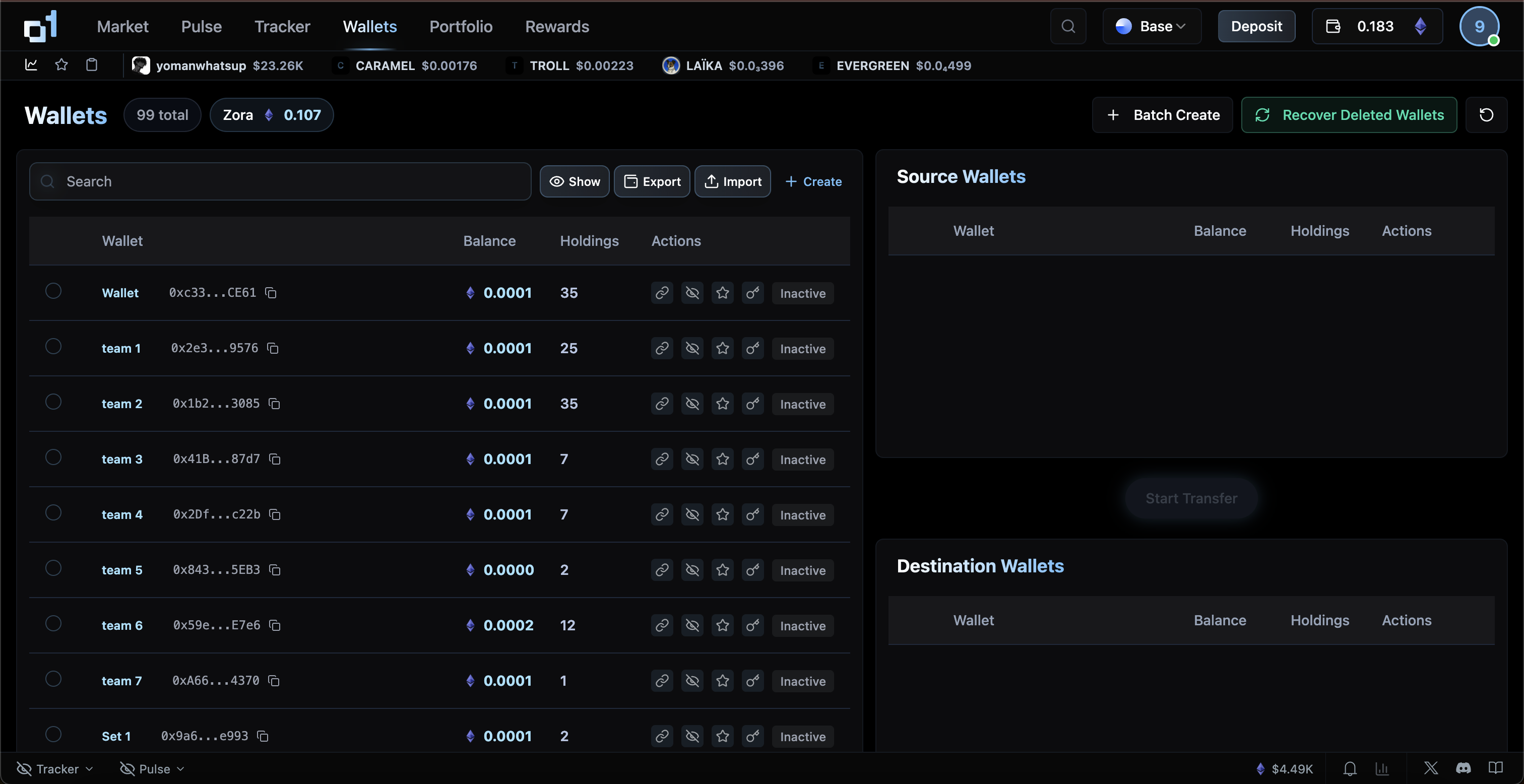
    <h4>1. View and Select Wallets</h4>

    <img src="https://mintcdn.com/o1exchange/lexUYbma1ezKWhoj/images/wallets.png?fit=max&auto=format&n=lexUYbma1ezKWhoj&q=85&s=1ccb42518b76643153819b5b223299a0" alt="Wallets overview" style={{ maxWidth: '100%', borderRadius: '8px', marginBottom: '8px' }} width="3024" height="1556" data-path="images/wallets.png" />

    <p>
      Access all your wallets in one place. Select the wallet you want to split tokens from or consolidate tokens into.
    </p>
  </div>

  <div>
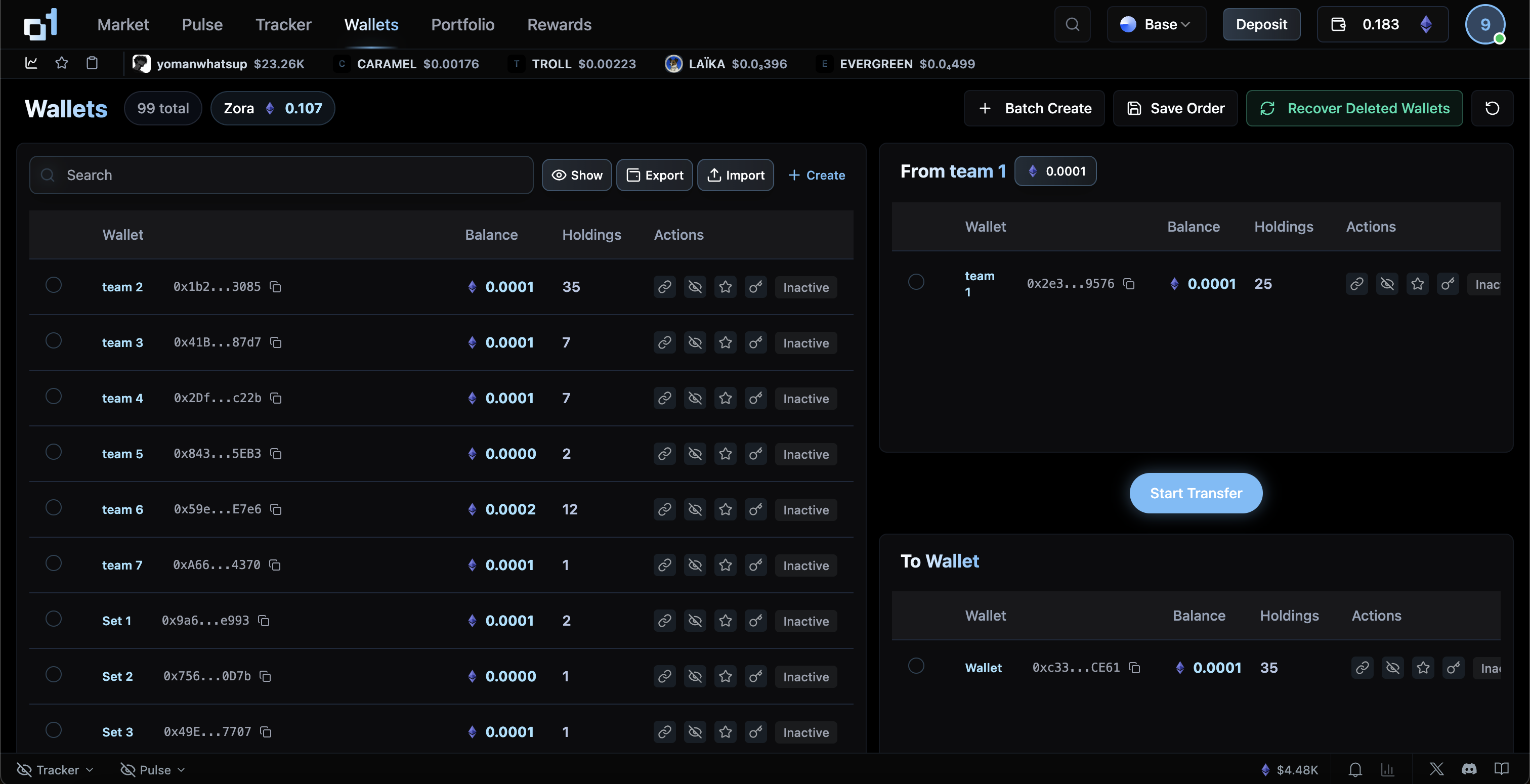
    <h4>2. Initiate Token Transfer</h4>

    <img src="https://mintcdn.com/o1exchange/lexUYbma1ezKWhoj/images/wallets-transfer-token.png?fit=max&auto=format&n=lexUYbma1ezKWhoj&q=85&s=d4289a4c62162150aa2be4ab8ed32aaf" alt="Initiate token transfer" style={{ maxWidth: '100%', borderRadius: '8px', marginBottom: '8px' }} width="3024" height="1550" data-path="images/wallets-transfer-token.png" />

    <p>
      Choose the "Transfer" option to move tokens between your wallets. Specify the amount and the destination wallet to split or consolidate your holdings.
    </p>
  </div>

  <div>
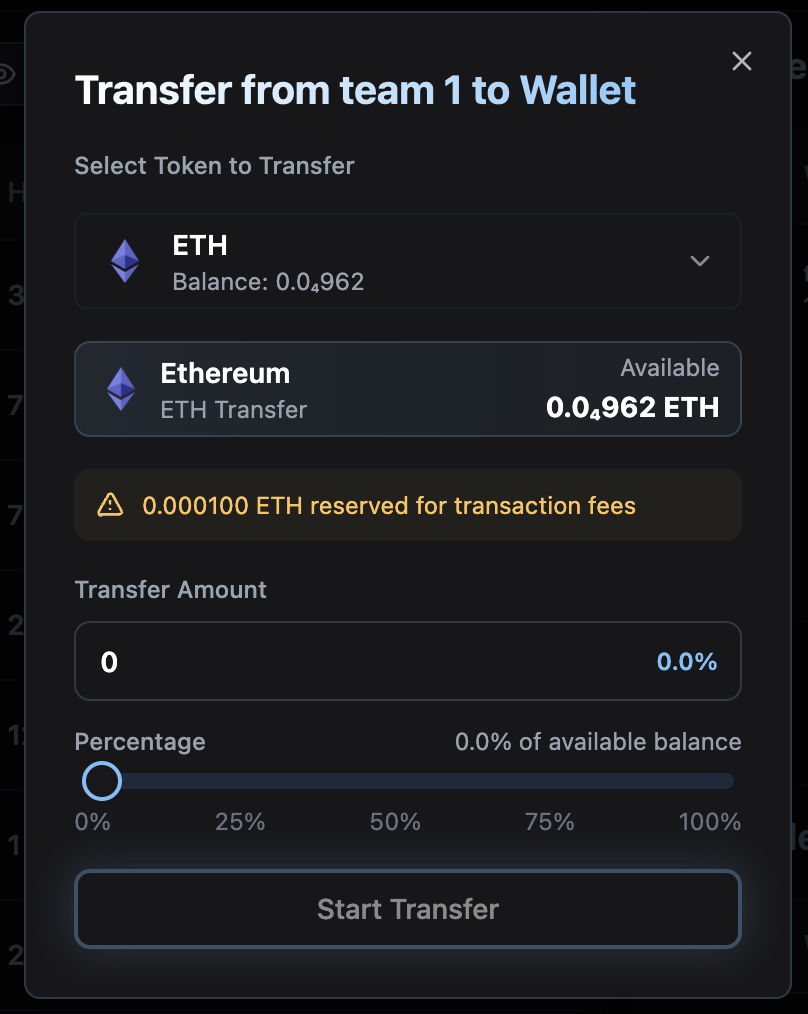
    <h4>3. Confirm and Complete</h4>

    <img src="https://mintcdn.com/o1exchange/lexUYbma1ezKWhoj/images/wallets-transfer-token-confirm.png?fit=max&auto=format&n=lexUYbma1ezKWhoj&q=85&s=25f10d4a04ffcfef52273124595bee5a" alt="Confirm token transfer" style={{ maxWidth: '100%', borderRadius: '8px', marginBottom: '8px' }} width="808" height="1014" data-path="images/wallets-transfer-token-confirm.png" />

    <p>
      Review the details and confirm the transfer. Your tokens will be moved instantly, allowing you to efficiently manage your portfolio across multiple wallets.
    </p>
  </div>
</div>

<Note>
  Wallets on o1.exchange are managed in a non-custodial way, giving you full control and flexibility. You can organize, back up, and manage multiple wallets with ease.
</Note>